Student Vocation Cybersecurity Learning Series — Lesson 2 of 30
Have you ever wondered what happens when you type a website address into your browser and press Enter? How does a message travel from your phone to a friend in another country? And how does your computer know where to find a website among millions of websites on the internet?
These questions introduce one of the most important foundations of cybersecurity: understanding how the internet works.
In Lesson 1, we learned that cybersecurity protects computers, networks, applications, and digital information. In this lesson, we will explore how devices communicate online, how websites deliver information, and why understanding internet communication is important for protecting digital systems.
You do not need advanced technical knowledge to follow this guide. We will begin with the basics and build your understanding step by step.
-
What Is the Internet?
The internet is a worldwide system of interconnected computer networks that communicate using agreed technical standards and protocols.
These networks connect computers, smartphones, servers, routers, and many other devices, allowing them to exchange information.
For example, when you use an online learning platform, your device communicates with computers that store and deliver the website’s pages, videos, and other resources.
The internet supports many activities, including:
- Sending and receiving email.
- Visiting websites and reading blogs.
- Watching online videos.
- Participating in virtual classes.
- Using online banking services.
- Sharing files and communicating with other people.
The internet is not one giant computer. It is a collection of connected networks that work together to move information from one place to another.
Internet vs World Wide Web
The internet and the World Wide Web are related, but they are not the same thing.
The internet is the underlying network infrastructure that connects devices and networks.
The World Wide Web (WWW) is a system of interlinked resources, such as websites and web pages, that people access over the internet using web browsers.
Email, online games, and other internet services may use the internet without being part of the World Wide Web.
Understanding this difference helps you recognize that the web is one service that operates on top of the internet.
-
What Do You Need to Access the Internet?
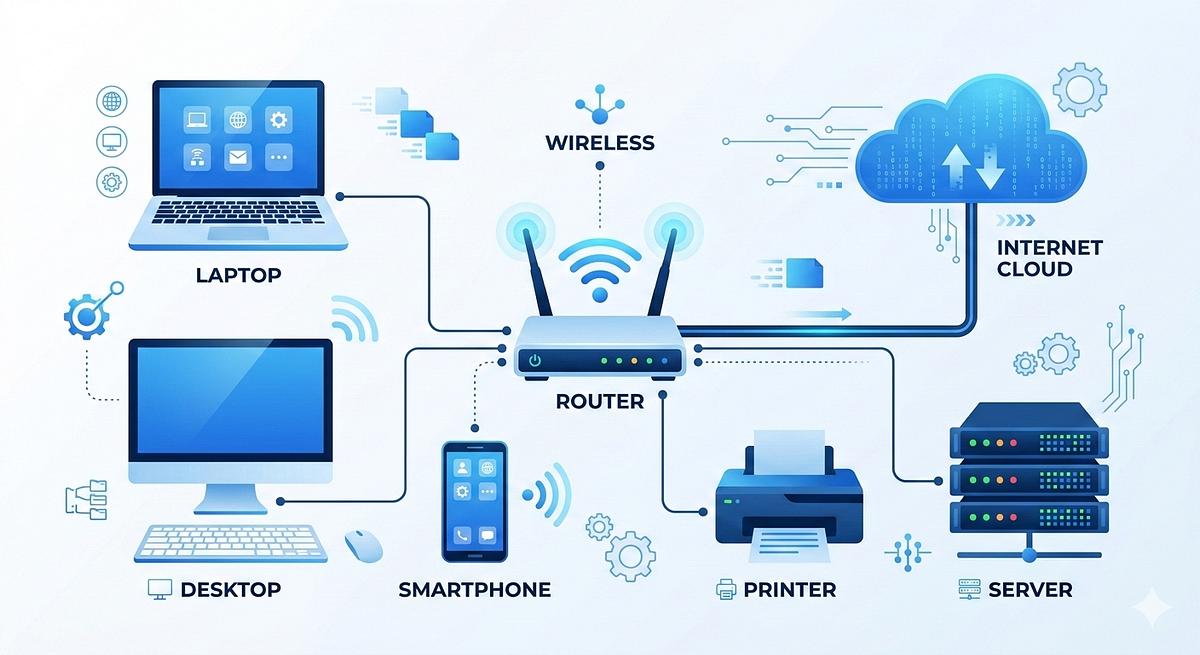
Several components work together to connect you to online services.
- Your device
This may be a laptop, desktop computer, smartphone, or tablet.
Your device runs applications that allow you to browse websites, send messages, or use online services.
- A network connection
Your device needs a way to connect to a network. This could be through Wi-Fi, an Ethernet cable, or a mobile network.
Wi-Fi connects your device to a local wireless network. It does not, by itself, guarantee access to the wider internet.
- A router or access point
A router helps direct traffic between networks. In a home, it commonly connects your local network to your internet service provider.
A wireless access point allows compatible devices to connect to a network using Wi-Fi. Many home internet devices combine routing and wireless access functions.
- An Internet Service Provider
An Internet Service Provider, or ISP, provides access to the internet.
Depending on the service, your connection may use fibre, cable, fixed wireless, mobile data, or another technology.
- Servers and online services
Servers are computers or software systems that provide resources or services to other systems.
For example, a web server can deliver a website when a browser requests its pages.
These components work together to let you access online information.
-
What Is a Client and What Is a Server?
One of the most important concepts in internet communication is the relationship between a client and a server.
What is a client?
A client is a device or application that requests a resource or service.
Your web browser is an example of a client when it requests a web page.
Other examples include an email application requesting messages and a mobile app retrieving information from an online service.
What is a server?
A server is a system or program that provides resources or services to clients.
A web server may deliver HTML pages, images, stylesheets, scripts, or other requested resources.
A server can also run application logic, access databases, and return the information an application needs.
A practical example
Imagine that you want to read an article on the Student Vocation Blog.
- You open a browser on your phone.
- You enter the blog’s web address.
- Your browser requests the necessary website resources.
- The relevant server processes the requests.
- The server sends responses to your browser.
- Your browser displays the page.
This is a simplified example. Modern websites may involve multiple servers, content delivery networks, databases, and other services.
The important principle is that a client requests a resource and a server provides a response.
-
What Happens When You Type a Website Address?
Consider this example:
https://www.example.com
When you enter a website address into a browser, several steps may take place.
Step 1: The browser interprets the address
The browser identifies the requested website and the protocol it should use.
In this example, https indicates that the browser should use HTTPS, which protects HTTP communication with TLS encryption.
Step 2: The browser finds the server’s address
The browser may need to resolve the website’s domain name to an IP address.
This is commonly done using the Domain Name System, or DNS.
For example, people can remember a domain name more easily than a numeric IP address. DNS helps systems discover the network address associated with that name.
The result may already be available in a cache, so a new DNS lookup is not always necessary.
Step 3: The browser establishes communication
Depending on the protocol and network configuration, the browser establishes the required connection or transport session with the server.
For HTTPS, the browser and server also establish the cryptographic protections needed for secure communication.
Modern web traffic may use HTTP/1.1, HTTP/2, or HTTP/3, which differ in how they transport requests and responses.
Step 4: The browser sends a request
The browser sends an HTTP request asking for a resource, such as a web page.
The request includes information needed by the server to understand what is being requested.
Step 5: The server responds
The server processes the request and returns a response. The response may contain HTML, an image, a stylesheet, JavaScript, or other content.
The server may retrieve data from an application or database before preparing the response.
Step 6: The browser displays the page
The browser processes the received resources and renders the page.
It may request additional resources, such as images, fonts, and scripts, before the page is fully displayed.
This entire process can happen very quickly.
-
What Are Data Packets?
Information sent across computer networks is commonly divided into smaller units called packets.
A packet carries a portion of the information being transmitted along with control information needed for delivery.
Think of sending a large document in several numbered envelopes. Each envelope contains part of the information and details that help the receiving system handle it.
Network communication works differently from physical mail, but the comparison helps explain why information is often divided into smaller units.
Why are packets useful?
Packets allow network equipment to handle information in manageable units.
Depending on the protocol, packets or transport segments may be transmitted, reordered, retransmitted, or processed independently.
The receiving system uses the relevant protocol rules to reconstruct or process the information.
How does this relate to cybersecurity?
Understanding packets helps cybersecurity professionals investigate network communication.
For example, network analysis may reveal:
- Which systems are communicating.
- Which protocols are being used.
- When communication occurs.
- Whether unusual traffic patterns are present.
- Whether a connection appears consistent with expected activity.
The information visible in a network capture depends on the protocol and whether the traffic is encrypted.
Encryption can protect the contents of communication, even though some connection metadata may remain visible.
-
What Are Internet Protocols?
A protocol is a set of rules that systems follow when communicating.
Without common protocols, devices and applications would struggle to exchange information reliably.
Several protocols and technologies are important for beginners.
HTTP and HTTPS
HTTP is used to transfer web resources between clients and servers.
HTTPS is HTTP protected by TLS, which helps provide confidentiality and integrity and allows the client to authenticate the server when certificate validation succeeds.
When you use HTTPS correctly, other people on the network generally cannot read the protected contents of the communication simply by observing the encrypted connection.
However, HTTPS does not automatically make a fraudulent website trustworthy. Criminals can also obtain valid TLS certificates for deceptive websites.
TCP
Transmission Control Protocol (TCP) provides a reliable, ordered byte stream between communicating applications.
It handles matters such as retransmission of lost data and delivery ordering.
Many web connections use TCP, although HTTP/3 uses QUIC, which runs over UDP.
UDP
User Datagram Protocol (UDP) sends datagrams without providing TCP-style guarantees of reliable, ordered delivery.
Applications may use UDP when its characteristics suit their needs, including some real-time communications and network services.
DNS
Domain Name System (DNS) helps systems find information associated with domain names, including IP addresses used to reach internet services.
DNS is a critical part of everyday internet use.
IP
Internet Protocol (IP) provides addressing and packet forwarding across interconnected networks.
IP helps packets travel toward their intended destinations, although delivery depends on the networks and protocols involved.
You will study IP addresses and DNS in more detail in Lesson 3.
-
What Is the Difference Between a Website and a Web Browser?
These terms are sometimes confused, but they have different roles.
A web browser is software used to access and display web resources. Examples include Chrome, Firefox, Edge, and Safari.
A website is a collection of related web pages and resources made available through web technologies.
For example, a browser is the application you use to visit a news website, an online classroom, or the Student Vocation Blog.
A browser does not normally contain every website you visit. It requests resources from the relevant online services.
This distinction is useful when troubleshooting problems. A website may be unavailable even though your browser is working properly, and a browser problem may affect access to websites that are otherwise available.
-
What Happens When You Send an Email or Watch a Video?
Not every internet service works exactly like loading a simple web page.
Sending an email
An email application submits a message to an email service. Mail servers then process and relay the message according to the relevant systems and protocols until it reaches the recipient’s mailbox.
The recipient’s email application retrieves or synchronizes the message using a supported method.
Watching an online video
A video service may send video in multiple segments rather than as one large file. The application downloads and buffers content so playback can continue smoothly.
Streaming quality may change according to network conditions, available bandwidth, and the service’s delivery methods.
Attending an online class
A virtual classroom may combine web requests, audio and video streams, messaging, and other network services.
Different types of communication may use different protocols and delivery methods.
These examples demonstrate that the internet supports many kinds of communication, not just browsing websites.
-
How Does Understanding the Internet Help in Cybersecurity?
Cybersecurity professionals need to understand how normal network communication works before they can reliably identify suspicious activity.
For example, consider the following situations.
Suspicious website addresses
A fraudulent website may use a domain name that closely resembles a trusted organization’s domain.
Understanding URLs and domain names can help you identify warning signs before submitting personal information.
Unexpected network traffic
A security analyst may notice a device communicating with an unfamiliar external service.
The connection is not automatically malicious, but it may warrant investigation based on the destination, application, timing, and surrounding evidence.
Unencrypted communication
When information is sent without suitable encryption, people who can observe the relevant network traffic may be able to read some of its contents.
Modern websites should use HTTPS to protect browser-to-website communication.
Fake public Wi-Fi networks
An attacker may create a wireless network with a misleading name to encourage people to connect.
Checking the network name with the legitimate provider and avoiding sensitive actions on untrusted connections can reduce risks. HTTPS remains important even when using a trusted network.
Misconfigured online services
A service may expose information or functionality that should be restricted.
Understanding clients, servers, network protocols, and access controls helps professionals investigate and correct these weaknesses.
The goal is not to fear the internet. It is to understand how it works so that you can use it safely and recognize when something deserves further investigation.
-
Essential Internet Safety Tips for Beginners
Use these practices as you continue your cybersecurity studies.
- Check website addresses carefully. Watch for misspellings and misleading domain names.
- Prefer HTTPS. Do not enter sensitive information on sites that lack appropriate secure connections.
- Keep your browser updated. Updates help address known security vulnerabilities.
- Be cautious with unexpected downloads. Obtain files and applications from trusted sources.
- Use multi-factor authentication. Protect important accounts with an additional authentication factor.
- Avoid sharing sensitive information unnecessarily. Understand what a website or service needs before providing personal data.
- Verify suspicious messages. Contact the organization through a trusted channel rather than relying on links in unexpected messages.
- Secure your home router. Use strong administrator credentials, modern Wi-Fi security, and available firmware updates.
Note: No single practice removes every risk, but multiple protective measures can significantly improve your security.